AI Compute Development
Console: User Interface (AI Compute Development Platform)
Route:/camp/dev
Primary Users: Algorithm engineers, data engineers, AI application developers, project administrators
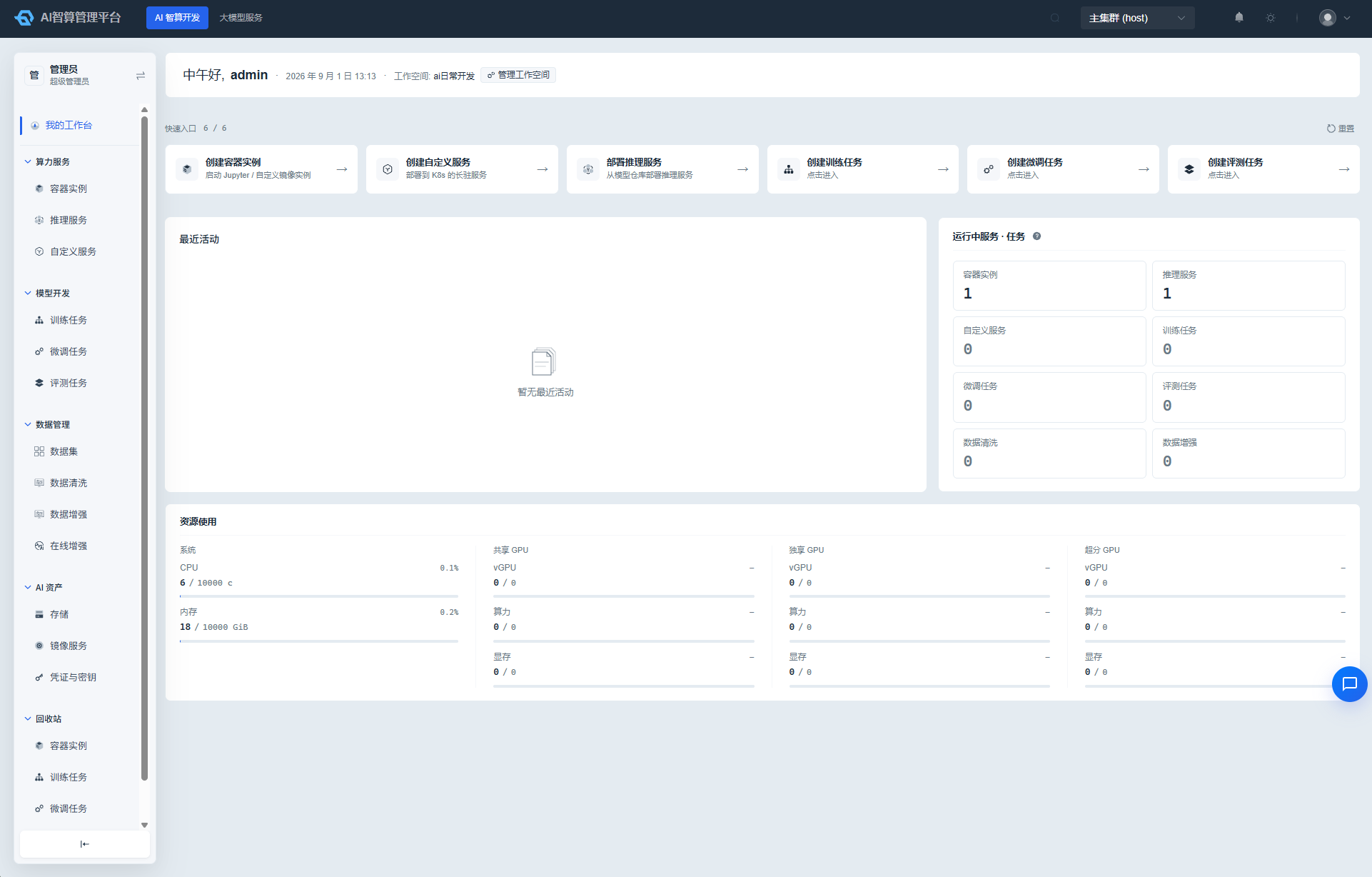
AI Compute Development is the core workspace for regular users on the Rise AI Compute Platform. Here, you can request GPU compute resources on demand, run interactive development environments, submit distributed training and fine-tuning jobs, deploy inference and custom services, and manage the full data lifecycle — from collection, cleaning, and augmentation to evaluation — around your datasets.
What Can I Do
| Role | Primary Use Cases |
|---|---|
| Algorithm Engineer | Run Jupyter/VS Code container instances, submit training/fine-tuning/evaluation jobs, deploy inference services |
| Data Engineer | Create and manage datasets, perform data cleaning and augmentation, prepare training corpora |
| AI Application Developer | Deploy custom services, call inference APIs, quickly validate model performance |
| Project Administrator | View workspace resources and task run status, manage images, storage, credentials, and other assets |
Core Capabilities
- Resource Overview: View workspace resource quotas, recent task activity, and running assets at a glance on the "My Workbench" dashboard.
- AI Assets: Manage image services, tenant storage, and sensitive credentials — the foundational dependencies for subsequent tasks.
- Compute Services: Create container instances, inference services, and custom services, covering the full workflow from development and validation to production deployment.
- Data Management: Full lifecycle management of datasets, including data cleaning, data augmentation, and online augmentation.
- Model Development: Submit training jobs, fine-tuning jobs, and evaluation jobs, with support for multiple distributed training frameworks.
- Recycle Bin: Recover or permanently delete accidentally removed container instances, training jobs, fine-tuning jobs, and inference services.
Submenu Overview
| Module | Menu | Description |
|---|---|---|
| Resource Overview | My Workbench | Workspace homepage: resource quotas, recent activity, quick-access shortcuts |
| AI Assets | Image Service | View public images, manage tenant/project private images |
| AI Assets | Storage | View public storage, create tenant custom storage volumes |
| AI Assets | Credentials & Keys | Manage image registry, SSH, API, and other sensitive credentials |
| Compute Services | Container Instances / Inference Services / Custom Services | Interactive development, model inference, general HTTP services |
| Data Management | Datasets / Cleaning / Augmentation / Online Augmentation | Data preparation lifecycle |
| Model Development | Training / Fine-tuning / Evaluation Jobs | Model training and evaluation |
| Recycle Bin | Recycle Bin | Recovery and restoration of instances, training, fine-tuning, and inference resources |
Typical Workflow
- Log in to the AI Compute Development Platform and confirm your current project and quota on My Workbench.
- Prepare images, storage, and credentials in AI Assets based on your task requirements.
- Create a development environment in Compute Services > Container Instances, or submit training/fine-tuning jobs using Model Development.
- Prepare and process datasets in Data Management.
- After model training is complete, deploy the model and obtain the API endpoint in Compute Services > Inference Services.
- If resources are deleted by mistake, you can recover them from the Recycle Bin.